CS2 Float Checker: Reading a Skin's Exact Wear Number

Sukie · Founder & Market Tracker
Sukie has tracked the Counter-Strike skin economy since 2023, maintaining a price-history spreadsheet that covers 400+ skins and testing every major marketplace with her own inventory. She writes and updates every guide on CS2 Skin Prices herself.
Last updated: 2026-08-23
A CS2 float checker is a browser tool that takes a skin's inspect link and returns the exact wear number behind it — six or more decimal places, plus the paint seed, the skin's own minimum and maximum range, and usually a rank showing how that copy compares to others. It exists because nothing inside the game or on a market listing will tell you the digits. You get a tier name, an image, and a price, and those three things routinely hide differences worth 30% of a purchase. csfloat's checker is the one most traders reach for, though several tools do the same job the same way; none of them need your login for a simple lookup.
What the Tool Is Actually Reading
Every skin in the game is created with a wear value between 0.00 and 1.00, assigned once at the moment of unboxing and never altered afterward. Playing with a weapon does not scuff it. Trading it does not age it. The number attached to your copy today is the number it was born with, and it will be the number a buyer sees in 2032.
An inspect link is a long URL containing the identifiers Valve's item servers need to look that copy up. When you paste one into a checker, the tool asks those servers for the item's data and reports back what it gets: the wear value, the paint seed, the finish's real range, and any pattern-specific details the finish carries. It is a lookup, not an estimate — which is why two different checkers fed the same link return identical digits.
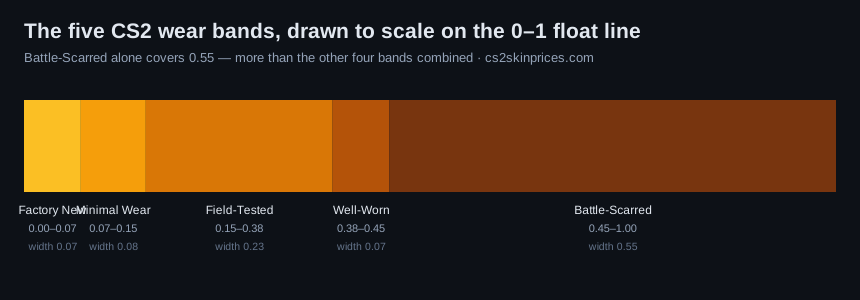
BLAST's primer on float values and wear levels is a good outside explanation of how the value maps onto the five named tiers. The short version: Factory New runs 0.00-0.07, Minimal Wear 0.07-0.15, Field-Tested 0.15-0.38, Well-Worn 0.38-0.45, and Battle-Scarred 0.45-1.00.
Three Routes to a Wear Number
A CS2 float checker is only one of three ways to learn something about wear, and each route answers a different question. Experienced buyers use all three rather than picking a favorite.
| Route | What it shows you | Speed | When to use it |
|---|---|---|---|
| In-game inspect | The 3D model with real wear rendered under real lighting, plus the tier name | Instant if the game is already running | Final eye test before committing, and for judging whether wear actually bothers you |
| Market listing | Tier name in the item title, a thumbnail, and an inspect button | Instant in any browser | Shortlisting. Never for the final decision, since a tier is a range |
| Third-party checker | Exact wear digits, paint seed, min/max range, and a rank among known copies | Under a minute | Any purchase where a tier boundary, a pattern, or resale value is in play |
Some marketplaces display exact wear directly on their listings, which removes a step for buyers there. Browser extensions do the same on Steam by injecting the value into each row. Both are conveniences layered on the same underlying lookup — useful, but worth spot-checking against a direct query before a large purchase.
Walkthrough: Inspect Link to Decision
Start to finish, this takes about forty seconds once you have done it twice.
- Open the listing you are considering on the marketplace where it lives.
- Find the Inspect in Game button. Right-click it and choose Copy link address rather than left-clicking, which would launch the game.
- Open the checker in a browser tab. No account, no download, and no game client required.
- Paste the link into the search field and submit.
- Read the wear value first. Compare it against the tier boundaries above and note how close it sits to the edge of its tier.
- Check the skin's own minimum and maximum, displayed alongside the result. Many finishes are capped and cannot reach the standard boundaries — the AK-47 Redline, for example, starts around 0.10 and runs to roughly 0.70, so a "low" Redline means something different than a low float on an uncapped skin.
- Note the paint seed if the finish is pattern-driven, and the phase if it is a Doppler.
- Repeat for the four or five cheapest comparable listings before deciding. This is the step that produces the savings, and it is the step people skip.
One caution on step 2: verify that the tier name the checker returns matches the listing you copied from. A mismatch almost always means the wrong link was copied, not that anything is wrong with the listing.
Reading the Output: Rank, Paint Seed, Phase
The wear value is the headline, but the rest of the result carries real information.
Rank
Many checkers show where a copy sits among all known copies of that skin and wear tier — something like "#412 lowest." Treat it as a rough indicator rather than gospel: it reflects items the tool has indexed, not every item in existence. A rank inside the top hundred is genuinely uncommon and prices accordingly. A rank in the tens of thousands is ordinary and should not command a premium.
Paint seed
An integer, typically 0-1000, that decides how the finish's texture is positioned on the model. On most skins it changes nothing you would notice. On Case Hardened, Fade, Marble Fade, Crimson Web, and a handful of others, it decides most of the price — the Karambit Fade guide covers how a seed translates into a fade percentage and why that matters more than wear on those finishes.
Phase
Doppler and Gamma Doppler finishes resolve to a phase at unboxing, and the checker reports it from the item data rather than from a seller's description. That distinction matters, because phase labels in listing titles are typed by humans. In June 2026 I ran a knife advertised as Phase 4 through a checker and got Phase 3 back — a real price difference, and almost certainly an honest mistake by someone repeating what they were told when they bought it.
When the Exact Number Changes the Price
Not every purchase needs a CS2 float checker. Four situations where skipping one costs money:
Near a tier boundary. Field-Tested spans 0.15 to 0.38, and a 0.152 copy looks close to Minimal Wear while a 0.375 looks nearly Well-Worn. Both carry the same label and often the same price, which makes the low end free value and the high end a quiet overpay. The full ranges and what each looks like sit in the CS2 float chart.
On capped skins. When a finish cannot reach 0.00, the meaning of "low" shifts entirely. Judging a capped skin against the standard tier boundaries produces the wrong conclusion in both directions.
Before reselling. A low number is only worth a premium if you can prove it, and buyers will check. Knowing the digits before you list means pricing to the copy rather than to the tier.
On pattern skins. Here the wear value can be the less important half of the result. Check both, and weigh the seed accordingly.
If you want the mechanics of each checking method in more depth, how to check a CS2 float walks through the in-game and market routes step by step, and the float pillar guide explains why the system exists at all.
Red Flags Worth Walking Away From
- A listing with no inspect link. Without one there is nothing to verify. Some private sale formats legitimately lack them, but for a standard listing an absent link means you are buying a label and a photograph.
- A seller's screenshot of a checker result. Images are trivially edited. Run the link yourself; it costs less time than reading the message asking you not to.
- Any "checker" that wants a Steam login or an API key. A wear lookup needs neither. Tools that ask are phishing for account access, and this is the most common way people lose inventories. The trading pillar guide covers how these approaches are usually framed.
- Pressure to skip verification. "Someone else is buying it" is a sales technique, not a fact you can check. A genuine listing survives forty seconds of due diligence.
- Numbers that do not match the range. If a claimed value sits outside the finish's own minimum and maximum, the claim is wrong regardless of how confidently it is made.
None of this requires trusting anybody. That is the point of the tool: it replaces a seller's word with data pulled from the game's own servers, for free, in under a minute. For a broader map of how wear, patterns, and rarity combine into the prices you see, start at the CS2 skin prices homepage.
Frequently asked questions
Is a CS2 float checker free to use?
Yes. The common tools run inspect-link lookups without charging, without requiring an account, and without needing the game installed. Some offer paid features around alerts or bulk searching, but the basic lookup that answers "what is this copy's exact wear" is free everywhere.
Do I need to own the skin to check its float?
No. Anything with a public inspect link can be looked up, which includes market listings, items in a public inventory, and items offered in a trade. That is the whole reason the tool is useful — it is designed for checking things you do not own yet.
Where do I find a skin's inspect link?
On a market listing, right-click the "Inspect in Game" button and copy the link address. In an inventory, open the item and copy the same link from its inspect option. Trade offers expose them too, though you should verify a link belongs to the item actually being offered rather than a lookalike.
Can a float value be faked?
The value returned by a lookup cannot be faked, because it comes from Valve's item servers rather than from the seller. What can be faked is a screenshot of a result, a listing description, or a link that points at a different copy than the one on offer. Always run the link attached to the specific item you are buying.
Does the in-game inspect show the exact number?
No. The inspect view renders the wear visually and displays the tier name, but never the digits. It is the best tool for deciding whether a given amount of scuffing bothers you, and useless for comparing two copies that sit close together.
What is a good float value?
It depends on the skin and your goal. Near the bottom of a tier is generally the value buy — a 0.16 Field-Tested rather than a 0.37 at the same price. But on capped skins the bottom of the tier may not exist, and on pattern-driven finishes the seed matters more. Read the number against the skin's own range, not against the tier alone.
Why do two skins with the same tier look so different?
Because a tier is a range, not a value. Field-Tested covers everything from 0.15 to 0.38, which is a wide enough span that the two ends genuinely look like different products. That gap is the single biggest reason to check digits before buying anything above pocket change.
Does checking a float require the game to be running?
Not for a third-party lookup — that runs entirely in the browser. You only need the game open for the in-game inspect view, which is worth doing separately if you want to see the wear rendered rather than read it as a number.
Can a skin's float change over time?
No. Wear is assigned at creation and is permanent. Using the weapon, trading it, applying stickers, or adding a name tag leaves the value untouched. Anyone claiming a skin will "wear down" with use is describing a system that does not exist in this game.
Can a float checker tell me a skin's pattern index?
Most can. Pattern index (sometimes called paint seed) is stored alongside the float in the same inspect data, and the better checkers surface both. It matters enormously on Case Hardened, Fade, Marble Fade and Doppler finishes, where the pattern rather than the float sets the price.
Does a float checker work on an item still in a trade hold?
Yes. The inspect link exposes the float regardless of trade status, so you can read a skin you have just bought and cannot yet move. What you cannot do is inspect an item you have no link for — the seller or owner has to provide it.