CS2 Skin Trading: How the Three Markets Actually Work

Sukie · Founder & Market Tracker
Sukie has tracked the Counter-Strike skin economy since 2023, maintaining a price-history spreadsheet that covers 400+ skins and testing every major marketplace with her own inventory. She writes and updates every guide on CS2 Skin Prices herself.
Last updated: 2026-07-31
CS2 skin trading is really three different games wearing one name: selling on the Steam Community Market for wallet credit, selling on third-party marketplaces for real money, and swapping items directly with other players. Each venue has its own fees, its own waiting periods, and its own failure modes — and nearly every expensive beginner mistake I have seen comes from not knowing which of the three games someone was actually playing when they clicked accept.
I have moved items out of my own inventory through all three routes since 2023, and the biggest lesson is that the venue matters more than the item. The same AK-47 Redline can become wallet credit in an hour, cash in your bank in two days, or a scammer's property in five minutes, depending on where and how you move it. This hub explains how the ecosystem fits together, what the fees genuinely cost you, and what a sensible first trade looks like from start to finish.
The Three Venues, Side by Side
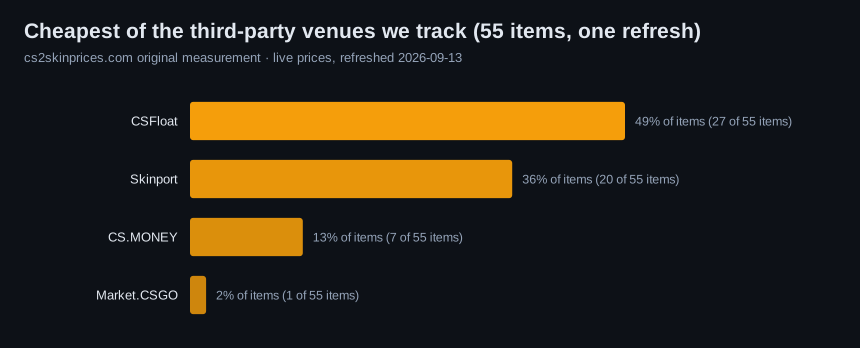
Everything in the Counter-Strike item economy flows through one of three doors. The Steam Community Market is Valve's official venue: massive selection, instant trust, but a 15% total fee on every sale and proceeds that are locked inside Steam forever. Third-party marketplaces — Skinport, CSFloat, Buff163, market.csgo, and DMarket are the names you will see most — exist because of that lock: they let sellers walk away with actual money, for seller fees that generally land somewhere between roughly 2% and 12% depending on the site and payout method. Peer-to-peer trades cost nothing in fees but carry the most risk, because an accepted Steam trade offer is final.
| Venue | Seller fees | Cash-out? | Typical speed | Main risk |
|---|---|---|---|---|
| Steam Community Market | 15% total (5% Steam + 10% CS2) | No — wallet funds only, forever | Minutes to hours for liquid items | The fee, and money trapped in Steam |
| Third-party marketplace | Roughly 2-12%, varies by site | Yes — bank, PayPal-style, or crypto | Hours to a few days including payout | Payout delays; phishing look-alike sites |
| Peer-to-peer trade | 0% | Only via risky off-platform payment | Instant once both sides confirm | Scams — accepted trades are never reversed |
Most people end up using two of the three: the Steam Market for small, fast moves and a marketplace when they want real money out. Pure peer trading is best treated as an advanced tool, for reasons the scam section below makes uncomfortably clear.
Steam Community Market: Mechanics and the Real Cost of 15%
Listing on the Steam Market takes about a minute: open your inventory, pick the item, click sell, set a price, confirm on your phone. The interface shows two numbers — what the buyer pays and what you receive — and the gap between them is the 15% total fee, split as a 5% Steam transaction fee plus a 10% CS2-specific fee. If a buyer pays $100 for your skin, roughly $87 lands in your wallet. On a $2 item the rounding stings a little more, since each fee has a minimum of one cent.
The part that surprises newcomers: Steam wallet funds can never be cashed out. Not partially, not with a fee, not through support. Wallet credit buys games, cases, and other skins, and that is the entire list. For a player who was going to spend the money on Steam anyway, this is fine — the Market's convenience and buyer depth are genuinely excellent. For anyone hoping to pay rent, it is the wrong venue entirely.
Two Market features are worth learning early. The price history chart on every listing page shows median sale prices going back years, which is the fastest reality check against a wishful asking price. And buy orders — standing offers from buyers at a set price — are the closest thing the Market has to an instant sell button: price your item at the highest buy order and it usually moves within minutes.
Third-Party Marketplaces: Where Real Money Comes Out
Third-party marketplaces exist to solve the wallet problem. You list a skin, a buyer pays the site, you deliver the item through a Steam trade offer to the buyer or the site's bot, and the site credits your balance — which, unlike Steam wallet funds, you can withdraw to a bank account, payment service, or crypto wallet.
The tradeoffs are real but manageable. Seller fees vary widely — as a rough range, expect somewhere between 2% and 12% depending on the site, the item category, and whether you take a slower payout or an instant one. Withdrawals often involve identity verification the first time, payout minimums, and their own small fees. Prices also tend to run below Steam Market listings, because buyers on cash marketplaces expect a discount for bringing real money. The honest summary: you accept slightly more friction and a slightly lower sticker price in exchange for money that actually exists outside Steam.
No single site wins on everything. Some emphasize low fees, some emphasize speed, some have deeper buyer pools in specific regions — Buff163's buyer base skews heavily toward China, for instance, which can mean stronger prices on certain knives and worse ones on others. The full walkthrough of listing, delivering, and withdrawing — including which route made more sense for my own items — lives in how to sell CS2 skins.
Peer-to-Peer Trades and the Waiting Periods Nobody Warns You About
Direct trades between two Steam accounts are the oldest form of cs2 skin trading, and mechanically they are simple: send a trade offer, both sides review, both confirm, items swap instantly. No fees, no site in the middle. The catch is everything around that simplicity.
First, the waiting periods. If you have not had the Steam Mobile Authenticator active for long enough, trades you make are held by Steam for 7 days before delivery. Items freshly bought on the Steam Market carry their own trade restrictions on top of that. The exact rules shift by scenario, so treat it as: expect up to 7-15 days of lockup in common situations, and check the specific item before promising anyone a fast trade. Steam Support's help pages document the current hold rules.
Second, and far more important: trade offers are final. Valve's official policy — in place since 2019 — is that scammed items are not restored, period. There is no support ticket, no goodwill exception, no undo. Every confirmation screen you click through is the entire safety system. That single fact is why the peer-trading world has evolved an entire taxonomy of tricks, from API-key hijacks to mid-trade item switches, and why I keep a dedicated field guide to CS2 skin scams — read it before your first direct trade with a stranger, not after.
Pricing a Trade Fairly: Floats, Patterns, and Sticker Math
A fair trade starts with knowing that two skins sharing a name are not the same item. Three attributes move the price beyond the base listing:
- Float value. Every skin carries a permanent wear number between 0 and 1, and copies near the clean end of their tier command real premiums. Never price a trade off the wear name alone — checking the exact float takes under a minute and regularly changes the math by 10-30%.
- Pattern. Some finishes render differently on each copy. Case Hardened skins with heavy blue coverage, Doppler knives in scarcer phases, and Fades with high color percentages can be worth multiples of an ordinary copy. If a trade partner is unusually eager to get one specific item of yours, pattern value is the first thing to check.
- Stickers. Applied stickers add something, but far less than sellers hope — as a loose rule of thumb, a small single-digit percentage of the stickers' own market price, more for rare crafts that collectors actually hunt.
The working method: look the exact item up on at least two venues, note the realistic sale price after fees, and compare those net numbers rather than sticker prices. A trade that looks even on Steam Market listings can be 15% lopsided in net terms.
Liquidity: What Sells in an Hour and What Sits for a Month
Liquidity — how fast an item converts to money near its listed price — varies enormously, and ignoring it is how people end up "rich" on paper with nothing they can actually spend.
The fast lane is popular weapon skins in the roughly $2-50 range: AK-47, M4A4/M4A1-S, and AWP finishes that thousands of players use daily, plus mainstream cases. These have deep buy orders and sell within hours at honest prices. The slow lane is expensive and niche inventory: high-tier knives, souvenir items, odd-float copies, and collector patterns. A five-figure item like the AWP Dragon Lore can take weeks to find its buyer, and forcing a fast sale usually means surrendering a meaningful chunk of its value.
Watching my own tracking sheet through the July 2025 case-price spike drove this home: mid-priced Redlines and Asiimovs were turning over the same day at elevated prices, while several high-end knives on the same sites just sat, repriced downward twice, and still took three weeks to move. When you value an inventory, mentally separate "what this lists for" from "what this converts to this week" — for anything illiquid, the honest number is the highest standing buy order, not the lowest ask.
A First Trade, Start to Finish
Here is the shape of a sensible first move, using a mid-priced skin as the example. Day one: enable the Steam Mobile Authenticator if it is not already active — this single step controls whether your future trades are held for a week. While any hold clocks run, do the research: pull up the item's Steam Market price history, check its float, and look at what it actually sells for on one or two cash marketplaces.
Then choose the door. If the goal is more skins or games, list on the Steam Market a few cents under the lowest current listing and let the 15% fee be the cost of convenience. If the goal is real money, list on a marketplace at a small discount to the Steam price, deliver the trade offer to the verified buyer or bot when it sells, and withdraw once the balance clears. If someone instead approaches you directly with an unsolicited offer — especially one that seems generous — slow down; that pattern is covered at length in the scam guide, and "too good" is the single most reliable warning sign in this hobby.
Whichever route you take, verify every confirmation screen line by line before accepting. It sounds paranoid until you remember there is no undo. New to the economy entirely? The first skin buying guide covers the purchase side of the same journey.
Frequently asked questions
Is CS2 skin trading allowed by Valve?
Yes. Trading through Steam trade offers, the Steam Community Market, and third-party marketplaces that deliver items via normal trades is an ordinary, permitted part of the game's economy. What violates Steam's rules is commercial fraud, using stolen payment methods, and scam activity — and Valve enforces those with trade bans. Gambling skins on third-party betting sites is a separate ecosystem that Valve has repeatedly acted against, and this site does not recommend it.
Why is my item stuck and untradable right now?
Almost always a trade hold. Accounts without a long-established Steam Mobile Authenticator have trades held for 7 days, and items newly purchased on the Steam Market carry their own temporary restrictions — in common scenarios expect up to 7-15 days before an item moves freely. The exact rules vary by situation, so check the item's own details in your inventory for its unlock date.
Can I turn Steam wallet money into real cash?
No — Steam wallet funds can never be cashed out, and no legitimate service can extract them for you. If you want actual money for your items, you must sell on a third-party marketplace before the value ever enters your Steam wallet. Anyone offering to convert wallet balance to cash is describing a scam.
How much does selling on the Steam Market really cost?
The total fee is 15% of the sale: a 5% Steam transaction fee plus a 10% fee specific to CS2 items. In practice, a buyer paying $100 leaves you with roughly $87 in wallet funds. Third-party marketplaces usually charge less — roughly 2-12% depending on the site — but their prices also tend to run a little below Steam's.
What is the safest venue for a complete beginner?
The Steam Community Market, comfortably. Every step happens inside Valve's own system, there is no counterparty to trust, and the worst realistic outcome is paying the 15% fee. Cash marketplaces are the reasonable next step once you can recognize a fake login page. Direct trades with strangers are where nearly all serious losses happen and should come last, if at all.