CS2 Inventory Value: How to Check It, and Why Every Checker Shows a Different Total

Sukie · Founder & Market Tracker
Sukie built and maintains the price feed behind CS2 Skin Prices, which has recorded the lowest live listing for a fixed list of skins, cases and knives every three days since 31 July 2026, and she tests marketplaces with her own inventory. She writes and updates every guide on CS2 Skin Prices herself.
Last updated: 2026-11-06
CS2 inventory value is the sum of what every item you own would fetch on the market, and you can check it in three steps: (1) open your Steam inventory and list each item by its full name, including the wear; (2) look each one up on the Steam Community Market or paste your profile into a third-party checker, which needs your inventory set to Public; (3) take 15% off the Steam figure, because that is what Steam and Valve keep when you sell. The number you end up with depends heavily on which price you add up, and that is most of what this page is about.
To show how far apart the totals get, I priced one ordinary seven-item inventory four ways: the cheapest third-party listing, the dearest of five third-party venues, the cheapest Steam listing and the median Steam sale. The same seven items came out anywhere between $319.64 and $435.58. Nobody made a mistake. Each figure answers a different question, and a checker that shows you only one of them, without saying which, can lead you badly wrong.
Below: the exact steps on Steam, the privacy setting a checker needs (taken from Steam's own help pages), the worked example and chart, the fee arithmetic, what a checker cannot see, and the phishing trick that uses "check your inventory value" as bait.
How to check your CS2 inventory value on Steam, step by step
Steam does not add your inventory up for you, but everything you need to do it yourself is on Steam, and doing it once by hand shows you exactly what an automated checker is doing on your behalf. Valve's Steam Trading FAQ describes where the inventory lives; the rest is the Market.
- Open your inventory. Sign in on the Steam website or client, hover over your profile name at the top and choose Inventory. Valve's FAQ gives exactly this route, and your profile page has a link to it too.
- Switch to the Counter-Strike 2 tab. Your inventory is split by game. Only the CS2 tab matters here.
- Check that each item can be sold. Select an item and read its details. Valve's FAQ says the item's Tags section shows whether it is tradable. Items that cannot be traded or sold can still look valuable, but you cannot cash them out, so leave them out of any total you plan to rely on.
- Write down the full market name. Not "Redline" but AK-47 | Redline (Field-Tested). The wear tier in brackets is part of the item's name on the market, and Field-Tested and Minimal Wear copies of the same skin are priced as separate items.
- Look each name up on the Steam Community Market. The listing page shows the current cheapest listing, the buy orders and a sales history. Write down the cheapest listing, and also note roughly where recent sales cleared.
- Add the column up, then work out what you would net. The cheapest-listing total is the "Steam value". What you would actually receive is about 15% less (worked out further down).
For a handful of items this takes ten minutes. For a hundred items it takes an evening, which is why checkers exist. The manual pass is still worth doing once on your five most valuable items, because those are where a checker's choice of price moves your total most.
One shortcut: sort out what matters before you start. If an item's cheapest listing is a few cents, an error on it barely moves your total. Spend the time on the items that make up most of the value.
How to make your inventory public for a third-party checker
A third-party inventory checker can only see your items if your inventory is set to Public. Valve's Steam Trading FAQ answers "Who can see my items?" in one line: you control it with the Inventory privacy setting, the options are public, friends only or private, and you can change it from your inventory or from your general profile settings. A checker is not on your friends list, so Friends Only blocks it just as Private does.
Steam's Steam Profile Privacy help page gives the route to the settings: from your Steam profile, click Edit Profile, open the Privacy Settings tab and pick a state. Steam says changes are saved automatically, so there is no save button to look for. Inventory has its own setting on that tab, which is the one a checker depends on.
Before you switch it, know what Public exposes. On 29 October 2026 I requested one public CS2 inventory from Steam's inventory address without signing in to anything. Steam returned every item along with each one's Wear Rating (the float) and pattern template. So a public inventory shows anyone exactly what you own and how clean each copy is. That is useful for trading. If you would rather not leave it on show, switch the setting back to Private once the checker has read your items.
The same test settles a safety question, covered in more detail at the end of this page. Because a public inventory can be read with nothing but your profile address, a genuine value checker never needs your Steam password, your Steam Guard code or your Web API key.
Why do different checkers add up different prices?
Checkers disagree because they multiply your items by different prices, and there are at least four prices for the same item at the same moment:
- Steam's cheapest listing. The lowest price any seller is asking on the Steam Community Market. Buyers pay this price, Steam's fees included, and pay it in Steam Wallet funds.
- Steam's recent sale price. What items actually sold for. Steam's market price endpoint returns a median sale price beside the cheapest listing, and the listing page charts the sales history.
- The cheapest third-party ask. The lowest listing across outside marketplaces such as CSFloat, Skinport, Buff.market, CS.MONEY and market.csgo. My price feed records this for every tracked item, venue by venue.
- A blended or "suggested" price. Some tools average several venues or apply their own reference. Unless the tool tells you its method, you cannot check it.
The gap between Steam and the outside venues is not a glitch. Valve's Community Market FAQ says money from Market sales stays in your Steam Wallet: it "cannot be withdrawn or transferred to another Steam account or to a bank/3rd party account." A Steam dollar can only be spent on Steam, so it is not surprising that sellers ask more of them for the same skin. Selling for money you can withdraw means an outside venue, under that venue's own terms; how to sell CS2 skins compares Wallet credit with cash. The same FAQ caps a Steam Wallet balance at $2,000 and a single listing at $1,800, so an item that trades above that level elsewhere cannot be sold on Steam at its outside price at all.
So when two tools disagree, the first question is not which one is right. It is which price each one is adding up. A tool built on Steam listings will nearly always show the bigger number. A tool built on the cheapest outside ask shows a smaller one that is closer to cash. For what one item costs right now, my feed's lowest third-party ask for a Field-Tested AK-47 Redline was $23.36 on the 4 November 2026 refresh. The Redline price guide tracks it over time.
Worked example: one seven-item inventory, priced four ways
Here is the disagreement measured on real numbers. The inventory is an example I chose, not anyone's real account: one case, a cheap pistol skin, two mid-price rifles, a budget knife and two of the most traded skins at the top. All seven are items my site tracks, so I have every outside venue's lowest ask for each.
The third-party columns come from my price feed, read at 10:46 UTC on 28 October 2026. The Steam columns come from Steam's own market price data, read at 06:49 UTC on 29 October 2026. That is a 20-hour gap, so treat small differences as noise. The large ones are far bigger than anything a day of drift produces.
| Item | Cheapest third-party ask (venue) | Dearest of 5 third-party asks | Steam cheapest listing | Steam median sale | Net to you if sold on Steam at the cheapest listing (Wallet funds) |
|---|---|---|---|---|---|
| Kilowatt Case | $0.07 (Buff.market) | $0.19 (Skinport) | $0.11 | $0.11 | ≈ $0.09 |
| USP-S | Cortex (Field-Tested) | $2.93 (Skinport) | $3.45 (market.csgo) | $3.97 | $3.91 | ≈ $3.45 |
| Glock-18 | Water Elemental (Field-Tested) | $16.50 (CSFloat) | $19.04 (market.csgo) | $20.98 | $21.67 | ≈ $18.24 |
| AK-47 | Redline (Field-Tested) | $23.54 (CSFloat) | $26.87 (market.csgo) | $31.90 | $32.01 | ≈ $27.73 |
| ★ Kukri Knife | Safari Mesh (Field-Tested) | $36.62 (CSFloat) | $40.69 (market.csgo) | $46.57 | $47.08 | ≈ $40.49 |
| AWP | Asiimov (Field-Tested) | $90.04 (CSFloat) | $106.57 (market.csgo) | $131.68 | $109.60 | ≈ $114.50 |
| M4A1-S | Printstream (Field-Tested) | $149.94 (CSFloat) | $163.36 (market.csgo) | $200.37 | $210.54 | ≈ $174.23 |
| Total | $319.64 | $360.17 | $435.58 | $424.92 | ≈ $378.73 |
Five things stand out.
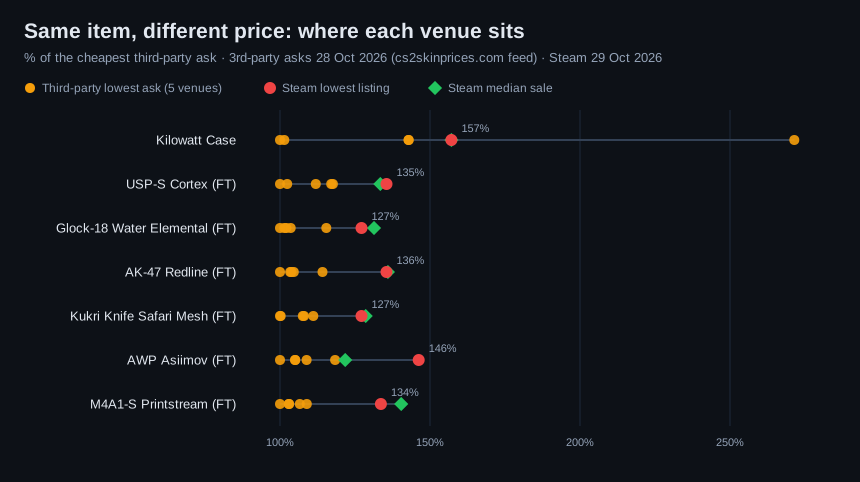
The spread is $116 on a $320 inventory. The cheapest-ask total is $319.64. The Steam listing total is $435.58, 36% higher. A checker built on one would show you the first, and a checker built on the other would show the second, for the same seven items on the same day.
Steam sat above every outside venue for six of the seven items. The exception was the Kilowatt Case, where Skinport's ask ($0.19) was above Steam's ($0.11). Items worth a few cents behave oddly, because a one-cent step is a big percentage.
Outside venues sit close together. Leaving out the case, the dearest outside ask was between 9% and 18% above the cheapest. The jump from the outside venues to Steam was bigger than the spread among the outside venues themselves.
A cheapest listing is not a sale price. The AWP Asiimov's cheapest Steam listing was $131.68, but the median sale Steam reported was $109.60. Nobody had to pay that $131.68. On a thinly traded item the cheapest listing can sit well above where things actually sell, and a checker that uses listings will count the higher figure.
Steam's net still beat the cheapest outside ask, but in a different currency. Selling all seven on Steam at the cheapest listing would leave you about $378.73 after fees. That is more than the $319.64 the cheapest outside asks add up to, but it is Wallet money you cannot withdraw. An outside venue also deducts its own seller fee from your sale. The marketplace comparison links each venue's fee page.
The chart puts every price on one scale. For each item, 100% is the cheapest outside ask. The orange dots are the other outside venues, the red dot is Steam's cheapest listing and the green diamond is Steam's median sale.
How much would you actually get if you sold on Steam?
On Steam, take about 15% off: you receive roughly the listing price divided by 1.15, and you receive it as Steam Wallet funds. Two fees make up that 15%, both set out in Valve's Community Market FAQ:
- The Steam Transaction Fee, "currently 5% (with a minimum fee of $0.01)". Valve notes it "may be increased or decreased in the future".
- The Counter-Strike 2 Fee, a game-specific fee "determined and collected by the game publisher" and "currently set at 10%".
The FAQ also says the buyer pays the Steam Transaction Fee and sees it before confirming. In practice the price on a listing is the buyer's total, and it is split between you and the two fees. That is why the conversion is to divide by 1.15, not to subtract 15%: a $200.37 Printstream listing leaves the seller about $174.23 (200.37 ÷ 1.15). On very cheap items, the $0.01 minimum makes the fee a bigger share. A $0.11 case leaves the seller about $0.09.
Four more rules from the same FAQ change what your inventory is "worth" on Steam:
- You cannot cash out. Market proceeds stay in your Steam Wallet. You can spend them on Steam, including on gifts for other users, but you cannot withdraw them.
- $2,000 wallet ceiling. You cannot list an item if your current balance plus the sale price would go over $2,000. A large inventory cannot be turned into Steam funds in one go.
- $1,800 listing ceiling. No single item can be listed for more than about $1,800. Anything worth more than that can only be sold elsewhere.
- Eligibility. To use the Market at all, an account needs a purchase older than 7 days (but not older than a year), and Steam Guard must have been on for 15 days.
So the "Steam value" a checker shows is closer to a buying price than to what you could sell for. The realistic figure is the net column in the table above, and only if your items really sell at the cheapest listing. To sell quickly you usually have to undercut it. If you want cash rather than Wallet funds, how to sell CS2 skins compares the routes step by step.
What an inventory value checker cannot see
Most checkers price your items by market name. Two copies of AK-47 | Redline (Field-Tested) get the same price, even though buyers do not treat them the same. Here is what a total built that way leaves out:
- Float within the tier. Steam's inventory data carries each item's Wear Rating, as the public-inventory test above showed. A name-based price still treats a 0.15 and a 0.37 Field-Tested copy as the same item. On a skin where a low float is in demand, the low-float copy is underpriced. The float-checking guide shows how to read yours.
- Applied stickers and patterns. They can add value or none, and a single market price does not reflect either way.
- Whether an item can be sold right now. A total that includes items you cannot trade or sell yet shows value you cannot actually get. Check each expensive item's own Tags in your inventory.
- How deep the market is. One cheap listing does not mean the next ten sell at that price. The Asiimov row above shows how far the cheapest listing and the typical sale can drift apart.
For the expensive items, look them up yourself: the float, the listing page and the recent sales, the way the step list above describes. Let the checker handle the long tail of cheap items, where a few cents of error does not matter. For the wider question of what the whole skin economy is worth, and a rule of thumb for discounting a checker's total, see CS2 skin market value. This page is about your own inventory, item by item.
Inventory value sites are a favourite phishing lure
"Check your inventory value" is one of the most common lures in CS2 phishing, because it is a reason people expect to paste in their Steam details. A genuine checker needs only your profile address or SteamID64 and a public inventory, which the test above confirmed. Anything that asks for more is not a value checker.
Leave a site immediately if it:
- shows a Steam sign-in page whose address bar is not steamcommunity.com or store.steampowered.com, or opens a pop-up "Steam" window that you cannot drag outside the browser (the fake sign-in pattern);
- asks for your Steam Guard code, or tells you to create a Steam Web API key and paste it in, which lets an attacker change your trade offers while you watch;
- wants you to "verify" items by sending them a trade offer, or makes you deposit items to see a value;
- arrives through a Steam chat or Discord message from someone offering to "price" your inventory.
Each of these is set out with its tell on the CS2 skin scams page, in particular the API-key hijack and the fake sign-in window. If you did type your details somewhere you should not have: change your password, revoke any API key you did not create, and act fast. Under Valve's Trade Protected Items rules (Season Two, July 2025), Counter-Strike item trades from the last 7 days can be reversed if you lose control of your account or are scammed, from the Trade History page. Valve's post does not say that a reversal is guaranteed in every case, so do not count on it.
Back on the cs2skinprices.com homepage, the live price board shows the current lowest ask for every item in this example. The trading hub covers how the Steam Market and the outside venues differ in more depth.
Frequently asked questions
Why does my CS2 inventory value differ between sites?
Because each site multiplies your items by a different price: Steam's cheapest listing, Steam's recent sales, the cheapest outside-marketplace ask, or its own blend. In our worked example the same seven items totalled $319.64 at the cheapest third-party asks and $435.58 at Steam's cheapest listings (third-party asks 28 Oct 2026, Steam 29 Oct 2026).
Do I need to make my Steam inventory public to check its value?
Only for third-party checkers. Steam's Trading FAQ says inventory privacy can be public, friends only or private. A checker is not your Steam friend, so it can only read a Public inventory. You can check by hand on the Steam Community Market with your inventory set to Private.
How much does Steam take when I sell a CS2 skin?
About 15%: Valve's Community Market FAQ lists a 5% Steam Transaction Fee (minimum $0.01) and a 10% Counter-Strike 2 fee. Because the listed price includes both, you receive roughly the listing price divided by 1.15, paid as Steam Wallet funds that cannot be withdrawn.
Is the Steam inventory value what I could cash out?
No. Steam Market proceeds stay in your Steam Wallet, which Valve caps at $2,000, and no single item can be listed above about $1,800. For cash you have to sell on a third-party venue, whose asks are usually lower than Steam's and which deducts its own seller fee.
Does an inventory checker count float and stickers?
Most price by market name, so every copy of an item in the same wear tier gets the same price. A low-float copy or a valuable sticker application is not reflected in the total. Price your most expensive items by hand.
Is it safe to log in to an inventory value website with Steam?
Be very wary. A public inventory can be read with only your profile address, so a genuine value checker never needs your password, Steam Guard code or Web API key. Fake Steam sign-in windows and API-key requests are the two main patterns on our CS2 skin scams page.