CS2 Trade Protection: The 7-Day Reversal Window, Explained From Valve's Own Rules

Sukie · Founder & Market Tracker
Sukie built and maintains the price feed behind CS2 Skin Prices, which has recorded the lowest live listing for a fixed list of skins, cases and knives every three days since 31 July 2026. She writes and updates every guide on CS2 Skin Prices herself.
Last updated: 2026-11-22
Illustrative scenario, not a real case: to see CS2 trade protection at work, picture a buyer who pays a stranger $60 by bank transfer for an AWP, accepts the trade, and sees the rifle in their inventory a second later. Five days on, the seller opens their Steam Trade History, presses reverse, and the AWP goes back to them. The $60 does not come back with it. That is the whole system in one story: since 16 July 2025, every Counter-Strike 2 item trade can be undone for 7 days by either account that took part.
Valve built it for the opposite case, the player whose account is phished and emptied. Steam Support's Trade Protected Items FAQ (read 13 November 2026) describes the rules: items arrive at once and can be used in-game, but for 7 days they are Trade Protected and cannot be consumed, modified or transferred; a reversal undoes all of the reversing account's protected trades from the last 7 days and puts that account on a 30-day trade and Market cooldown. This page walks through those rules, then what they change for marketplace buyers, trade-up contracts, the Steam Market and accounts that collect weekly drops. Where Valve has not documented something, the page says so instead of filling the gap.
What Valve actually announced
The feature arrived inside Valve's Season Two: Episode One announcement on 16 July 2025. The relevant paragraph is short: "In the unlikely event that you lose control of your account or were the target of a scam by a bad actor, you may reverse all Counter-Strike item trades from the last 7 days." It adds that the reversal button lives on the Trade History page of your Steam account and links to a Steam Support FAQ for the details.
That FAQ is where the rules are. It says Counter-Strike 2 is currently the only game with Trade Protected items and that Valve plans to bring the feature to other games. It also says the protection is a per-game setting, so every CS2 item received in a trade is protected for 7 days. There is no opt-out: "it is not possible to trade those items without the associated features."
Two details in the FAQ matter more than they first look. First, the protection is marked visibly: protected items carry a yellow shield in your inventory and in the trade window. Second, it cannot be mixed. CS2 items cannot share a trade with items from a game that lacks Trade Protection, because "all items in a trade need to have the same level of protection". A CS2-for-Dota or CS2-for-TF2 swap in a single trade offer is no longer possible.
Earlier versions of this site described CS2 trades as final. That stopped being true in July 2025, and the scams and selling guides were corrected in October 2026 against the same Valve post.
Seven days of protection, and what you can do during them
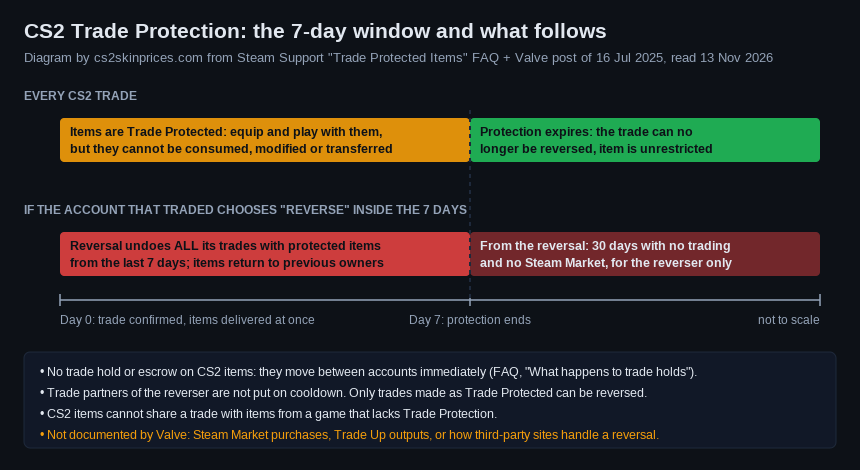
The diagram on this page lays the window out as a timeline. The rules behind it all come from the FAQ.
At the moment a trade is confirmed, the items move. The FAQ is explicit that CS2 items "are not subject to trade holds or trade escrow" and are "immediately traded between accounts because of Trade Protection", whatever security the account has. You can equip a protected rifle and play a match with it straight away.
What you cannot do for the next 7 days is anything that would make the trade impossible to undo. The FAQ lists three verbs: protected items "cannot be consumed, modified, or transferred (including being moved to a Storage Unit)". In practice that rules out the obvious follow-ups to a purchase. You cannot trade the item onward, so flipping it within the week is out. You cannot use it as an input to a Trade Up Contract, because the contract consumes its inputs. You cannot open a case you received in a trade, because opening consumes the case. And you cannot apply stickers or other changes that would alter the item.
When the 7 days end, the protected status expires and, in the FAQ's words, "the trade can no longer be reversed". From that point the item is ordinary inventory. A useful habit follows from this: treat any CS2 trade as provisional until its shield is gone, and plan anything that depends on the item, such as a resale or a contract, for day eight.
Valve's FAQ gives the window in days, not hours, and does not say whether it is counted from confirmation to the second. If timing is close, check the item in your inventory; the protection marker is the authority, not your own count.
What happens when someone presses reverse
A reversal is not surgical. The FAQ says that when you choose to reverse, "all trades containing Trade Protected items from the last 7 days will be reversed". You cannot pick one bad trade and keep the rest. Every item from those trades goes back to its previous owner.
The cost falls on the account that pressed the button. It is "restricted from trading and using the Steam Community Market for 30 days", its own Market listings are returned to its inventory, and its pending trade offers are cancelled. Its trade partners are not penalised: "only the account which initiated the trade reversals receives a 30 day trade and market cooldown." Steam Support will not lift that cooldown, and the FAQ says so directly.
Two limits keep the system narrow. Only trades created as Trade Protected, showing the yellow shield, can be reversed; anything traded before the feature existed cannot be undone by the player or by Steam Support. And the reversal is something you start yourself from your Trade History page. Valve's advice is to make sure you are back in control of the account first, and to contact Steam Support if you are not, because reversing trades while an attacker still has access helps nobody.
For the honest user whose account was taken, that design is the point: one action recovers every item the attacker traded away in the last week. For everyone else, it means a trade partner can hand themselves a 30-day lockout in exchange for taking back everything they traded to anyone that week. Most will never do it. The rest of this page is about the few who might.
Trade holds, Steam Guard and the restrictions that still apply
Before July 2025, the protection against theft was the trade hold: items from an account without a Steam Guard Mobile Authenticator sat in escrow for days before moving. For CS2 items that is gone. Trade Protection replaced the delay before delivery with a reversal window after it.
The account-level restrictions did not go away, and they decide whether you can trade at all. Steam Support's Trading and Market Restrictions page (read 13 November 2026) lists them; the ones that most often surprise CS2 traders are:
- Steam Guard must have been on for 15 days. Without it you cannot trade or use the Market. Turning Steam Guard off and on again restarts the clock.
- A new device is locked for 7 days after it is authorised by email, unless you have had a mobile authenticator for at least 7 days, in which case new devices carry no restriction.
- Removing the mobile authenticator blocks trading and the Market for 15 days.
- A password reset (not a normal change) blocks both for 5 days, or 30 days if the account had no activity for over two months.
- Cancelling an accepted trade that is on hold blocks trading for 7 days. That rule matters for non-CS2 items; CS2 items no longer go on hold.
- A VAC, cooldown or Overwatch ban ends access to the CS2 store and to trading CS2 items.
The same page notes that a trade cooldown, "including cooldowns applied by the Trade Protection system", also limits the Community Market. None of these rules can be lifted by Steam Support. The cheapest protection remains the mobile authenticator: it removes the new-device lock, it confirms every trade on your phone, and it makes the reversal button something you are unlikely ever to need.
Buying CS2 skins on third-party marketplaces
Most cash marketplaces for CS2 items deliver the item by an ordinary Steam trade, either from the seller's account or from the site's own. Valve's FAQ makes no exception for those trades, so an item bought this way arrives Trade Protected like any other. Two consequences follow.
The first is the 7-day freeze on your side. You can use the item in-game at once, but you cannot resell it, move it to a Storage Unit or feed it into a contract until the protection expires. If your plan was to buy low on one site and list it on another the same afternoon, the plan now takes a week.
The second is the reversal risk on the seller's side. Within those 7 days, the account that sent you the item can reverse its trades. Valve documents what that does on Steam and nothing more: it says nothing about how a marketplace treats the money once an item it sold is pulled back. That is set by each marketplace's own terms, and they differ. Before you buy anything expensive, read how the site handles a seller who reverses, whether it holds the seller's payout until the protection has passed, and whether you are refunded automatically. Our comparison of CS2 skin marketplaces covers fees and cash-out; check the reversal policy alongside it.
The safest structure is the one where neither side is paid until the 7 days are up. A deal that pays the seller instantly, outside any platform, is the structure the reversal scam below depends on.
Trade-up contracts and opening cases
Trade Up Contracts became more interesting in October 2025, when Valve's 22 October 2025 update let five Covert items be exchanged for a knife or gloves. They also became a common reason to buy inputs in bulk. Trade Protection slows that down. A contract consumes all of its inputs, and the FAQ says protected items cannot be consumed, so any input you received in a trade cannot be used until its 7 days have passed.
The same logic applies to containers. A case bought from another player arrives protected, and opening it would consume it, so the case waits a week before it can be opened. Items you unbox or receive from your own contract were not traded to you, so the FAQ's trade rules do not cover them.
Because a protected item cannot be consumed, an item that is still reversible can never have gone into a contract, so there is no documented case of a contract being unwound. Valve's pages say nothing about it either way; treat any claim about "reversed trade-ups" as unsourced.
For the contract itself, the float rules and the five-Covert route are covered on CS2 trade up float and CS2 knife trade up.
The Steam Community Market
The Market has its own wait, and it predates Trade Protection. Valve's 2 October 2024 release notes made "all items acquired from the in-game store (including the Armory), Trade Offers, and Steam Community Market" subject to "a 7 day re-trade and re-market restriction". Steam Support's restrictions page puts it more generally: items bought in-game or on the Market are not tradable or marketable until the date shown on the item in your inventory. That date, not a rule of thumb, is what to check.
Whether a Market purchase can be reversed through Trade Protection is not documented. The FAQ speaks only of trades, and Valve's announcement only of "Counter-Strike item trades". It does say that when the account that started a reversal has items listed on the Market, those listings are returned to it. Nothing on Valve's pages says a completed Market sale is pulled back.
Three later Market changes are also worth knowing. Since the 12 November 2025 update, newly purchased Name Tags and StatTrak Swap Tools cannot be traded or listed on the Market. Since the 4 March 2026 update, an item you list stays in your inventory and can be equipped while it is listed, though it cannot be consumed or modified. And since the 22 April 2026 update, a single trade offer containing CS2 items is limited to 1,000 items.
For how to choose between Steam wallet credit and cash when you sell, see how to sell CS2 skins. This page does not repeat it.
What a trade-reversal scam looks like
The scenario at the top of the page is the basic shape, and it has three ingredients. The scammer sends you a real item through a real Steam trade, so everything on Steam looks normal. You pay them by a route Steam cannot see: a bank transfer, a payment app, crypto, a gift card, or items in another game. Then, inside 7 days, they reverse. Steam returns the item to them because, as far as Steam knows, it was taken from a compromised account. Your payment was never part of the trade, so nothing returns it.
The cost to the scammer is a 30-day trade and Market cooldown, which a throwaway or rotated account barely notices. That is why the pattern is aimed at private cash deals between strangers, and why the tells are about structure rather than profiles:
- Pressure to pay outside a marketplace, usually with a discount as the bait.
- A seller who wants payment before the 7 days are up and will not wait for the shield to clear.
- Insistence on payment methods that cannot be reversed or disputed.
- An account that has just sold or traded many items in a short time, which raises the chance it reverses them all at once.
The defence is timing. Do not release money for a CS2 item until its protection has expired, or use a marketplace whose terms cover a seller reversal. If someone will not accept that, the deal was not safe. The other common schemes, from API-key hijacks to fake Steam admins, are covered on CS2 skin scams; Trade Protection helps against several of them, because the victim can now reverse what was taken.
Weekly drop accounts and trade restrictions
Some players run several accounts to collect weekly care packages and then move the items to one main account. Trade Protection changes the arithmetic of that.
Every transfer between those accounts is a trade, so every item that reaches the main account arrives protected. It cannot be traded on, opened, used in a contract or moved to a Storage Unit for 7 days. Weekly drops themselves need Prime: the Steam store's description of the Prime Status Upgrade says Prime players are eligible for "Prime-exclusive souvenir items, item drops, and weapon cases". So each extra account is a paid account before it collects anything.
Valve does not document a separate trade rule for care-package items. What does apply to every account, drop collector or not, is the restrictions list above: 15 days of Steam Guard before trading, a 7-day lock on new devices without an authenticator, and, for the Market, a successful purchase older than 7 days but less than a year old. Limited user accounts are also blocked from several features; Steam's restrictions page points to its separate Limited User Accounts article for the details. A drop account that is banned stops receiving drops and cannot trade CS2 items.
What a drop is actually worth, and which cases come through the pool now, is on the CS2 active drop pool page. The general rules for drops are in how CS2 drops work. For a summary of the whole trading system, the CS2 trading hub is the place to start, and the home page carries live prices across the market.
Frequently asked questions
How long is the trade hold on CS2 items now?
There is none. Steam Support's Trade Protected Items FAQ says CS2 items are not subject to trade holds or escrow and move between accounts immediately. The 7-day Trade Protection window comes after delivery instead, and during it the items cannot be consumed, modified or transferred.
Can I reverse just one CS2 trade?
No. A reversal undoes every trade containing Trade Protected items from the last 7 days, returns all of those items to their previous owners, and puts your account on a 30-day trade and Steam Market cooldown that Steam Support will not lift.
Can a Steam Community Market purchase be reversed?
Valve does not document that. Its FAQ and announcement describe trades only. What is documented is that Market purchases carry their own re-trade and re-market restriction until the date shown on the item, set at 7 days in Valve's 2 October 2024 notes.
Does Trade Protection apply to games other than CS2?
Not as of the FAQ read on 13 November 2026. It names Counter-Strike 2 as the only game with Trade Protected items and says Valve plans to extend the feature. That is also why CS2 items cannot be traded together with items from other games.